BLOGGER TEMPLATES AND TWITTER BACKGROUNDS »

Sunday, March 7, 2010

11th week report

22/03/2010,Monday
Assignment;
-Learn about microprocessor II
1. doing exercise about turning on LEDs(it is to turns the led connected to B1,B3,B5 and B7 on while those connected to B0,B2, B4 and B6 remain off


2. doing execise about lights up led while counting from 0 to 255. The led wiil be moved
-Assist technician Pn. Siti Fatimah to setup her microprocessor laboratory
Location;Microprocessor Laboratory
Technician;Pn.Siti Fatimah

23/03/2010,Tuesday
Assignment;
-Learn about on general steps on how to use warp 13 and test the PIC with simple code that download


-Construct the circuit given to test the IC that download from warp 13 software
Procedures;How To Use Wap13
Location;Microprocessor Laboratory
Technician;Pn Siti Fatimah

24/03/2010,Wednesday
Assignment;
-Learn about on microcontroller laboratory
1. provide the assembly code for running the circuit to dispaly 7 segment dispaly

Location;Microprocessor Laboratory
Technician;Pn Siti Fatimah

25/03/2010,Thursday
Assignment;
-Make PIC assembly code for reads DIp switch to light approciate leds and construct the circuit on the breadboard
Objectives;To read the DIP position and then light up the binary equivalent on the leds
Examples;setting the first five DIP position high places 11111 in binary(31 in decimal) on Port A. Your progam reads this and lights up leds 0,1,2,3,4 leaving led 5,6,7 off
Apparatus;Braedboard,crystal oscillator 4Mhz,resistors 220 and10K,PIC16F84,Red led,DIP switch and warp 13 board.
Location;Microprocessor Laboratory
Technician;Pn Siti Fatimah

26/03/2010,Friday
Assignment;
-Make assembly codes for exersice blink an led at a desired rate and constructs the circuit on the breadboard to test the PIC
Objective;To blink the led attached to line RB0 on port B
Location;Microprocessor Laboratory and Technician Room

10th week report

15/03/2010,Monday
Assignment;
-Attend sharing session by En.Musa
-Learn about;
1. contuinity pn the breadboard
2. measure the resistors,current,voltage
3. component function
4. crocodile technology software
5. Eagle Software


6. How to make gerber files
Location;Computer Based Training Room(Data Networks)
Course;Introduction to Basic Electronic
Presenter;En.Musa(technician)
Session;Morning

16/03/2010,Tuesday
Assignment;
-Attend sharing session by En Isnani
-Learn about;
1. what is PCB ?
2. Apparatus and material to make PCB
3. Process of PCB making


Location;PCB Laboratory
Course;Printed Circuit Board Manufacturing
Presenter;En Isnani(technician)
Session;Morning

Assignment;
-Attend sharing session by Pn Siti Hawa
-Learn about;
1. What is soldering
2. Soldering tools
3. How to solder
4. safety precaution
5. Desoldering technique
-Solder the component on the pcb board


Project;Knight Rider
Location;Tutorial Room Microprocessor
Course;Basic Soldering Technique
Presenter;Pn Siti Hawa(technician)
Session;Evening

17/03/2010,Wednesday
Assignment;
-Attend sharing session by Pn Faizah
-Learn about;
1. how to measure resistance,current,voltage using digital multimeter
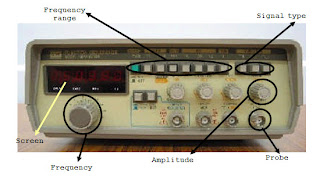
2. function each part of signal generator and power supply
3. oscilloscope:
a. function each part of oscilloscope
b. how to calibrate oscilloscope
-Check the waveform knight rider circuit
Location;Analog Digital Laboratory
Course;Introduction To Basic Measuring Equipments
Presenter;Pn Faizah(technician)
Session;Morning

Assignment;
-Attend sharing session by Pn Siti Fatimah
-Learn about;
1. to be familiarized with the MPLAB and assembly language
2. to be familiarized with the PCW(C compiler) and C language
Location;Microprocessor Laboratory
Course;Intoduction To PIC microcontroller
Presenter;Pn Siti Fatimah(technician)
Session;Evening

18/03/2010,Thursday
Assignment;
-Attend sharing session by En Yassin
-Learn about on introduction to electrical system.(3 Phase System)
Location;Computer Based Training Room
Course;Basic Electrical Technology System
Presenter;En Yassin
Session;Morning and Evening

19/03/2010,Friday
Assignment;
-Attend sharing session by En Zuraimi
-Learn about on Single Phase Electrical Wiring
1. identify type of ending wiring
2. identify type of accesorries domestic wiring
3. accessories connection
4. accesssories tester
5. learn how to sketch wiring
6. wiring according from the sketch
Location;Power System Laboratory
Course;Domestic Electrical Wiring & Safety
Presenter;En Zuraimi(Technician)
Session;Morning & Evening

9th week report

8/03/2010,Monday
Assignment;
-Troubleshoot led knight rider with the technician
-Check waveform and contuinity
Apparatus;digital multimeter and oscilloscope
Result;
-contuinity is okay
-waveform is not fixed and difficult to read
Location;analog digital laboratory
Technician;Pn Faizah

9/03/2010,Tuesday
Assignment;
-Assist technician(Pn Siti Hawa) check components for the training/symposium whether have the stock or not
-Connecting the components on the new veroboard(knight rider led)
Location;
Technician;Pn Siti Hawa

10/03/2010,Wednesday
Assignment;
-Learn how to solder in the right way with the technician
-soldering the components on the veroboard (Project knight Rider)
-There are 2 methods:
>First
. Heat the components "feet" with the soldering iron at the same time put the solder lead
>Second
. Heat the soldering iron first.Then put solder lead at the tip soldering iron
Apparatus;Solder lead and soldering iron


Location;
Technician;Pn Siti Hawa

11/03/2010,Thursday
Assignment;
-Check led knight rider with the technician
Result;Contuinity is okay but led not function as we need.the led not working like knight rider.The led working when we move or "play" ic timer 555
Assignment;
-Learn how to use the sucker

-See how the technician solder components on the PCB for led knight rider
Result;led on the PCB(printed circuit board) are function as led knight rider
Location;
Technician;Pn Siti Hawa

12/03/2010,Friday
Assignment;
-Check waveform knight rider led circuit with the technician
-Assist the technician(Pn Siti Hawa) pack the components for symposium training and take the soldering iron from the technician (En Yassin and En Isnani)
Location;
Technician;Pn Siti Hawa
-Assist the technician(En Musa) install the software Lochmaster 3.0 and crocodile technology in his lab about 16 computers
Location;
Technician;En Musa

Saturday, March 6, 2010

8th week report

1/03/2010,Monday
Assignment;
-Learn about equivalent circuits by doing equivalence resistor networks experiments
-Compare the measured values with calcculated values based on theory
-Edit knight rider design using Lochmaster 3.0 to get best result
Experiment;Equivalence Resistor Networks
Apparatus;Power supply,DMM,Resistor(220,100,1K,2K)ohm
Location;Analog Digital Laboratory and Technician Room
Technician;Pn Faizah and En.Musa

2/03/2010,Tuesday
Assignment;
-Doing an experiment star delta transformation about how to measure total across the two points A and B using DMM
-Doing an experiment superposition by measure voltage drop across resistors
Apparatus;Power supply,DMM,resistor(1K,1.5K,1.8K,10K)
Location;Analog Digital Laboratory
Technician;Pn Faizah

3/03/2010,Wednesday
Assignment;
-measure the output waveform of simple RC and RL circuits excited by step functions
-see the technician help the students design the circuit using crocodiles technology software
Apparatus;Function generator,oscilloscope,DMM
Location;Analog Digital Laboratory and Technician Room
Technician;Pn Faizah and En Musa

4/03/2010,Thursday
Assignment;
-Learn from En Isnani how to cut the veroboard
-Connect the components on the veroboard according Lochmaster design
-Soldering the components

Procedures;How To Cut A Veroboard
1.Prepare the veroboard.
2.Calculate how many holes of veroboard based on Lochmaster design.It is to get veroboard size that needed.
3.Please prepare two planks for holding the veroboard to ensure the veroboard do not damage when we saw it.
4.Lastly,cut the veroboard with the saw carefully.
Apparatus;saw and two planks
Location;Technician Room and
Technician;En Musa and En Isnani

5/03/2010,Friday(MY BIRTHDAY)
Assignment;
-Soldering the components on the veroboard
Project;Led Knight Rider
Problem;2 led are not light up
Apparatus;Soldering iron,solder lead,power supply
Location;Technician Room
Technician;En Musa

Sunday, February 21, 2010

7th week report

22/02/2010,Monday
Assignment/Task;
-assist technician:En Musa
1. create the folder for stock component
2. create the folder for total component
-get soft copy from Pn Faizah about Lab Manual/Experiment circuit theory
Location;Technician Room,analog digital lab
Technician;En Musa and Pn Faizah
Special Event;attend Dr. Sheikh Muszaphar Shukor speech about his experience to become an astronout


saya sebelah kiri baju kuning,Abg Zuraimi...................

23/02/2010,Tuesday
Assignment;
-Learn about Lochmaster 3.0 from En Musa how to design Knight rider circuit
-Check knight rider circuit using DC power supply
-1st result: LED are dimp
-connect the components once again
-2nd result: LED are bright
Location;Technician room
Technician;En Musa

24/02/2010,Wednesday
Assignment;
-Edit Knight Rider design and Lochmaster 3.0

component side


solder side


-Prepare information and learn some theory that needed before doing practical with Pn Faizah
Location;Analog Digital Laboratory
Technician;En Musa

25/02/2010,Thursday
Assignment;
-Learn and do experiments on how to use the power supplies,digital multimeter(DMM),signal generator and oscilloscope


-Experiments;
1. using DMM to measure the DC power supply
2. using the digital multimeter for continuity
3. using DMM and bredboard to measure some resistors
4. using oscilloscope and function generator
-Learn about node voltage and mesh currents methods experiments
Apparatus/components;
1. DC power supply
2. Digital multimeter
3. Oscilloscope
4. Function generator
5. Breadboard
6. Wires(single core)
7. Resistors
Location;Analog Digital Laboratory
Technician;Pn Faizah

26/02/2010,Friday
-Holiday(Maulidur Rasul)

Saturday, February 13, 2010

6th week report

15/02/2010,Monday
Holiday(Chinese New Year)

16/02/2010,Tuesday
Holiday(Chinese New Year)

17/02/2010,Wednesday
Assignment;
-check project knight rider circuit connection with Pn Siti Hawa.
-connect the components on the breadboard breadboard back
-result;6 led display/emit the light
Apparatus;Power supply(6V)
Location;EE Central Store
Technician;Pn Siti Hawa

18/02/2010,Thursday
Assignment;
-assist technician(En Musa)
1.edit dreamweaver component folder(webpage) to link to Homepage ee central store plan
2.make the folder for the component in the cupboard in ee central store
Location;Technician Room
Technician;En Musa

19/02/2010,Friday
Assignment;
-attend the technician training by Cik Siti Hajar and Pn Suhaili
-Title:Basic Electro Pneumatic
-Learn about connection for electropheoumatic circuit

Sunday, February 7, 2010

5th Week Report

8/02/2010,Monday
Assignment;
-assist technician(Cik Hajjar)
1. arrange new components into rack
2. manage borrowing component by student in EE Central store[8.30am-12noon]
-assist technician(En Musa)
1. sketch ee central store plan and draw using microsoft visio


Location;EE Central Store and Technician Room
Technician;Siti Hajar and En Musa

9/02/2010,Tuesday
Assignment;
-edit the folder microsoft excel and save into webpage
-clouring ee central store plan using microsoft visio


Location;Technician room
Technician;En Musa

10/02/2010,Wednesday
Assignment;
-assist technician(Cik Siti Hajjar)
1. arrange dismantle components into the rack
2. manage borrowing components by student in ee central store
-edit the folder microsoft excel and save into webpage
Location;EE Cenral Store and Technician Room
Technician;Cik Siti Hajjar and En Musa

11/02/2010,Thursday
Assignment;
-assist technician(Pn Siti Fatimah)
1. manage borrowing component by student in ee central store(10am-12noon)
-assist technician,En Musa
1. edit the folder microsoft excel and save into webpage
2. setup the printer
Location;EE Central Store and Technician Room

Technician;Pn Siti Fatimah and En Musa

12/02/2010,Friday
Assignment;(Project Knight Rider)
-connecting the component on the breadboard according to schematic circuit given
-find datasheet about component for this project.
Component/material;


1. diode 1N4148-10
2. red led-10
3. capacitor 1u-1
4. trimmer resistor 500k-1
5. resistor 22k-1
6. resistor 333R-1
7. IC 555 & IC CD 4017
8. breadboard

9. single core wire
Location;Technician Room
Technician;En Musa